
Progressive Lenses for Computer Use: Office Progressives vs Standard
Updated AUG 18, 2026 • 6 min read

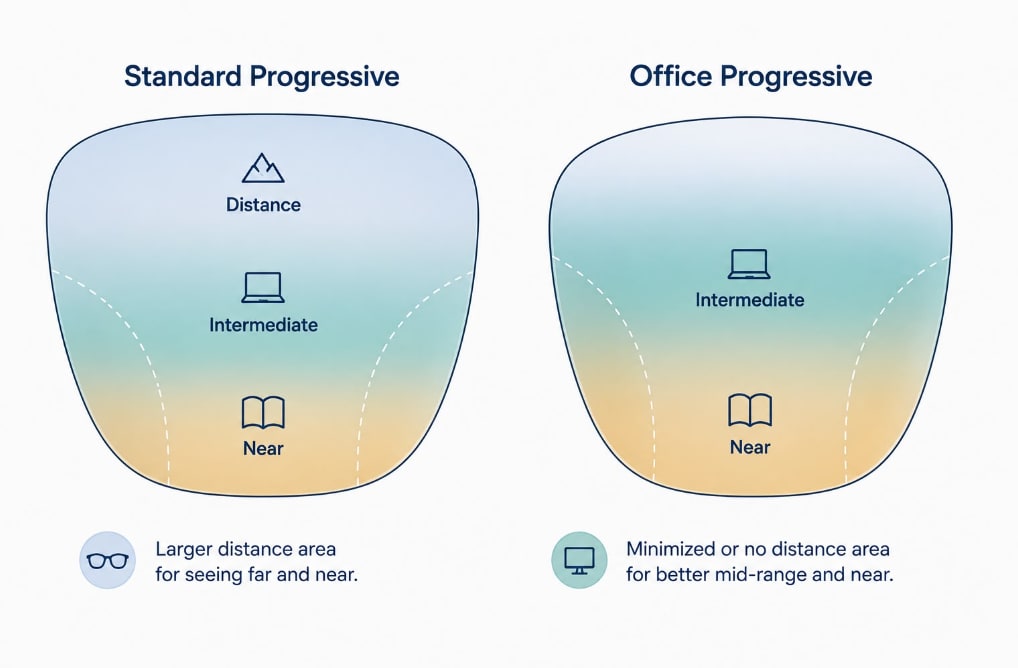
| Standard progressive lenses divide their space across distance, intermediate, and near vision, which means the intermediate zone used for computer screens may feel more limited than in a lens designed specifically for computer use. Office (or computer) progressives are a specialized design that, depending on the design, may reduce or remove the distance zone and dedicate more of the lens to intermediate and near vision instead — generally not intended for driving but designed to make extended desk work more comfortable for many wearers. Many people who work at a screen for many hours use office progressives as a second, task-specific pair alongside their regular everyday glasses, rather than as a replacement. |
Introduction
If you wear progressive lenses and spend a large part of your day at a computer, you may have noticed that finding a comfortable position for the screen takes more effort than it seems like it should – tilting your head, adjusting your chair height, or leaning in slightly to keep the screen in focus. This can be a predictable consequence of how standard progressive lenses are designed.
This guide explains why that happens and what office/computer progressive lenses do differently. For adaptation to progressives generally, see our guide how to adjust to progressive lenses; for the reading zone specifically, see how to read with progressive lenses; and for the broader picture, see our complete guide to progressive lenses

Why Standard Progressives Can Feel Limiting for Computer Work?
A standard progressive lens is built to handle three tasks in one lens: distance vision at the top, intermediate vision (roughly arm’s length) in the middle, and near vision for reading at the bottom. Because a standard progressive is designed to provide multiple viewing distances within one lens, the usable area for each distance is shaped by the overall lens design – including the intermediate area used for computer work, which may feel more limited than the corresponding area in a lens designed specifically for office or computer use.
Computer glasses are designed with a correction specifically for computer screens, typically positioned about 20 to 26 inches from the face, and are intended to help people who switch focus often between different distances during the workday, according to the American Academy of Ophthalmology. “Computer glasses” is a broad term — it can refer to single-vision lenses set for one specific screen distance, or to office/computer progressives like the ones described in this article, which provide a range of intermediate and near distances in one lens. The office and computer progressive designs described here are one category within that broader concept.
Because the intermediate area in a standard progressive may be more limited, small shifts in head position or posture can move your line of sight out of the clear area – which can contribute to head tilting, chair adjustments, or leaning toward the screen to compensate.
What Office and Computer Progressives Do Differently
An office (or computer/occupational) progressive lens is built around a different set of priorities. Depending on the specific design, it may reduce or remove the distance-vision zone and dedicate more of the lens to intermediate and near vision instead, rather than splitting the lens evenly across all three distances.
- More space dedicated to intermediate vision: This is the main design change, and it may make computer work more comfortable for some wearers – there’s generally more usable lens area at screen distance, which can mean small posture shifts are less likely to push your line of sight out of focus.
- Reduced or limited distance correction, depending on design: Because the lens is generally optimized for close and intermediate range, it’s typically not intended for distance tasks like driving.
- Sometimes more usable near vision as well: Some office progressive designs also provide more usable near vision, depending on the specific lens design and intended working distances, since desk work often involves switching between a screen and printed material.
| Standard Progressive | Office / Computer Progressive | |
| Distance vision | Included | Reduced or limited, depending on design |
| Intermediate vision | Available, shared with other zones | More space typically dedicated to this zone |
| Near vision | Available | Designed for intermediate and near tasks |
| Driving | Generally suitable for distance tasks | Not intended for driving |
| Typical role | Everyday, all-purpose pair | Second, task-specific pair for desk work |
| Worth knowing: Office progressives are generally intended as a second pair for desk work, not a replacement for your everyday glasses. Because distance correction is reduced or removed, they’re generally not suitable for driving or other tasks that require clear distance vision. |
Monitor Distance and Positioning
Regardless of which lens design you use, screen position affects comfort. The American Academy of Ophthalmology recommends sitting about 25 inches (roughly an arm’s length) from the screen, with the screen positioned so your gaze is directed slightly downward rather than straight ahead or upward.
- Screen distance: Around 20–26 inches from your eyes is the typical range cited for standard monitor setups.
- Screen height: Positioning the top of the screen at or slightly below eye level generally supports a comfortable, slightly downward gaze – which also tends to align better with where the intermediate zone sits in a progressive lens.
- Multiple monitors: Wide or dual-monitor setups can be more challenging with any progressive design, since the usable clear zone doesn’t necessarily extend across the full width of a large or multi-screen setup. This is worth mentioning to your optician if your setup includes wide, high or multiple screens.
- Laptops: Laptop users may face different ergonomic challenges, since the screen is often positioned closer and lower than a desktop monitor. An external monitor and separate keyboard can make it easier to maintain a comfortable viewing distance and screen height during extended work.
A Note on Blue Light Coatings
Blue light filtering coatings are sometimes offered as an add-on for computer-use lenses. It’s worth knowing what the current evidence actually shows before deciding whether this is something you want. The American Academy of Ophthalmology states that there is no scientific evidence that the kind or amount of light coming from computer screens is damaging to the eyes, and does not recommend special eyewear specifically for this purpose. The Academy attributes digital eye strain primarily to how screens are used – particularly reduced blinking, rather than to blue light itself.
If digital eye strain is your main concern, factors such as appropriate screen positioning, regular breaks, and blinking habits have more direct support in current guidance than blue-light filtering specifically. A lens designed for your working distance may also be worth discussing with your eye care provider if your current glasses are uncomfortable for extended computer use. This isn’t a reason to avoid a blue light coating if you’d like one; it’s simply useful context for deciding what to prioritize.
Is a Second Pair Worth It?
Whether an office progressive makes sense as a second pair generally depends on how much of your day is spent at a screen and how much discomfort you currently experience with your regular progressives during that time.
- Likely worth considering: You work at a computer for many hours most days and regularly notice neck strain, needing to tilt your head, or eye fatigue that seems tied to screen use specifically.
- Possibly unnecessary: Your computer use is occasional, or you haven’t noticed particular discomfort with your current progressives at screen distance.
This is ultimately a conversation to have with your eye care provider, who can assess your specific visual needs, work setup, and prescription to advise whether a dedicated office progressive is likely to help in your situation.
For many people who spend the bulk of their workday at a screen, the discomfort isn’t a sign that something is wrong with their glasses generally – it’s that a standard progressive is being asked to do a job it wasn’t primarily designed for. A dedicated office progressive is one practical option worth discussing with your eye care provider if this describes your day-to-day.
FAQ’s
Can I use office progressives as my only pair of glasses?
For most people, office progressives are better suited as a task-specific pair rather than their only glasses, because they are designed primarily for intermediate and near vision and may provide limited distance vision. Most people who use them keep their regular progressives or distance glasses for everyday use and switch to office progressives specifically for extended desk work.
Will an office progressive lens fix my neck and shoulder strain from computer use?
It may help some wearers, since a design with more space dedicated to intermediate vision can reduce the need to tilt your head or adjust posture to find clear focus – but posture, monitor height, and chair setup also play a meaningful role. If strain persists after trying an office progressive and adjusting your setup, it’s worth discussing with your eye care provider, primary care provider or a physical therapist, since the cause may not be solely optical.
Do I need a blue light coating with my computer glasses?
This is optional and comes down to personal preference. Current guidance from the American Academy of Ophthalmology does not identify blue light from screens as harmful to the eyes and does not recommend special eyewear for this specific purpose. If digital eye strain is your main concern, an appropriately designed lens for computer distance and regular screen breaks are more directly supported by available guidance than a blue light coating specifically.
How is an office progressive different from just wearing reading glasses at my desk?
Reading glasses are typically set for one fixed near distance, which may not match your actual screen distance (usually farther than typical reading distance) or allow you to also see printed material at a different distance without switching glasses. An office progressive provides a gradient across intermediate and near distances, which can be more versatile for a desk that involves both a screen and paperwork.
| Disclaimer: This article is for informational purposes only and is not medical advice. The information presented is general in nature and may not apply to your individual circumstances. Consult a licensed eye care professional for personalized recommendations. Never disregard or delay professional medical advice based on this article. GlassesUSA makes no warranties regarding the information presented. Reliance is at your own risk. The eye care professional featured in this article is a paid spokesperson for GlassesUSA. All images in this article were generated using artificial intelligence (AI). |
Published August 18, 2026|Updated August 18, 2026
