
How to Read with Progressive Lenses: Tips for New Wearers
Updated AUG 18, 2026 • 4 min read

| The reading zone in a progressive lens sits at the bottom and is generally more limited than the dedicated near area of a bifocal or single-vision reading lens. To use it comfortably, lower your gaze toward the bottom of the lens and adjust your head position as needed, rather than relying on eye movement alone. If text stays blurry no matter how you position your head, or if reading remains consistently difficult after giving it some practice, that’s worth raising with your optician or eye care provider – it may relate to fitting height or lens design rather than something you can adjust on your own. |
Introduction
Of all the adjustments new progressive wearers work through, reading tends to be the one that generates the most day-to-day frustration – not because it’s complicated, but because the reading zone is smaller and positioned differently than what most people are used to from single-vision reading glasses or bifocals.
This guide focuses specifically on the reading zone: how it’s positioned, how to use it comfortably, and what tends to cause the most common complaints. For adaptation to progressive lenses generally, see our guide how to adjust to progressive lenses; for the broader picture, see our complete guide to progressive lenses.
Understanding the Reading Zone
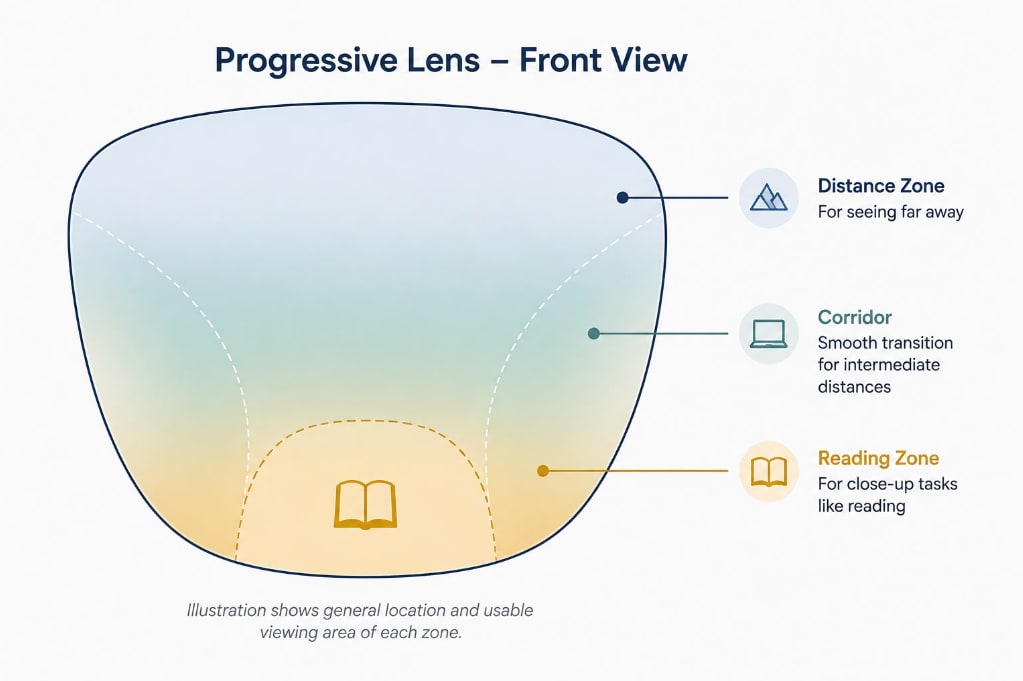
In a progressive lens, the reading zone sits at the bottom, connected to the distance zone at the top by a corridor – a narrow vertical channel through which the lens power gradually changes. The design and width of this corridor influence how much usable viewing area a wearer has as the lens power changes from distance to near, and different progressive designs balance these areas differently. A frame with limited vertical depth can also affect the available space for progressive lens zones, depending on the lens design and fitting requirements.
This is also why frame choice matters for progressive lens performance – a frame with limited vertical depth may not provide enough room for the lens design and fitting requirements needed for comfortable use of the different viewing zones.
| Good to know: The exact size of your reading zone depends on your specific lens design, your prescription (particularly your ADD power, which is the additional magnification built into the lower portion of the lens), and how the lens was fitted to your frame. If your reading zone feels unusually small, it’s worth asking your optician whether a different lens design might offer a wider zone. |
How to Position Your Head and Gaze for Reading?
One adjustment some new progressive wearers find helpful is to avoid relying on eye movement alone – a habit that works fine with single-vision lenses but may be less effective with a progressive’s more limited reading area.
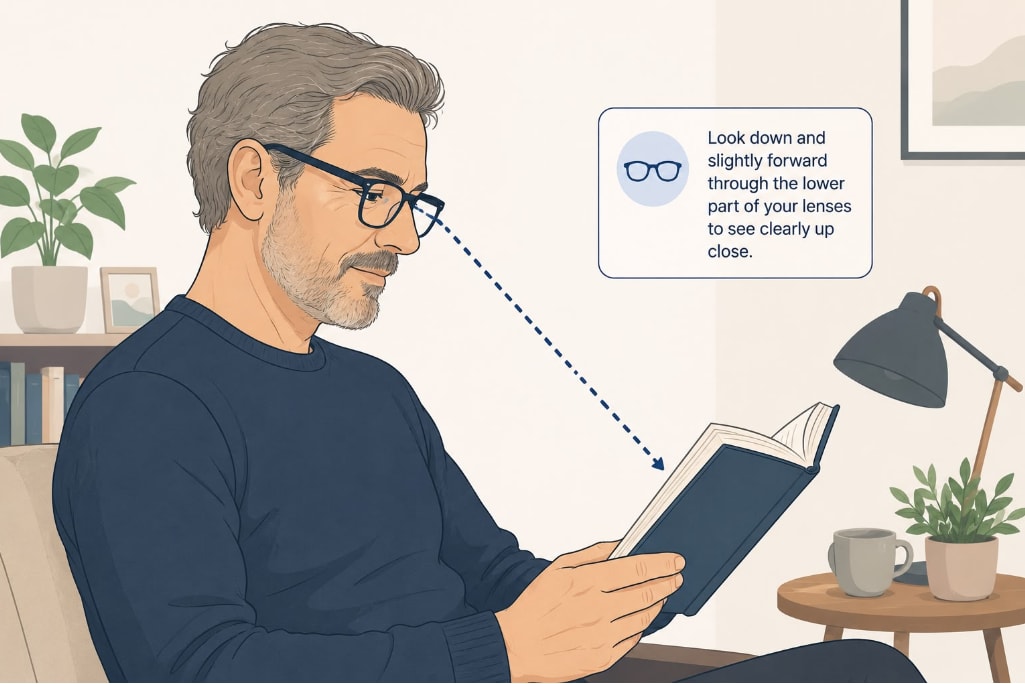
- Lower your gaze toward the lens’s reading zone. To read something in front of you, try looking through the lower portion of the lens and adjusting your head position as needed, rather than tilting the reading material up toward your eyes.
- Try moving your head slightly along the line as you read. Rather than relying on your eyes alone to scan across a line of text, some people find it helps to turn their head slightly to track the line, keeping their line of sight within the reading zone.
- Bring the material to a comfortable distance and height. Rather than holding a book or phone unusually low or far to compensate, position it at a distance and height where your natural, lowered gaze lands comfortably within the reading zone.
This takes some practice, and it’s common for it to feel unfamiliar for the first stretch of wear. If reading remains genuinely difficult after some practice, that’s a fit or lens-design question worth raising with your optician rather than something to keep working around indefinitely.
Reading Distance vs. Computer Distance
Progressive lenses are typically designed with a standard reading distance in mind – roughly the distance most people naturally hold a book or phone. Computer screens are usually positioned farther away than that, in the intermediate zone rather than the near/reading zone.
This is why some people find that a standard progressive lens works well for books and phones but feels less comfortable for extended computer use – the intermediate zone in a standard progressive may feel more limited than the reading zone for some wearers, and screen distance doesn’t always align neatly with either zone. If you spend many hours at a screen, this is worth understanding in more depth in our guide to progressive lenses for computer use, which covers office-specific lens designs built around intermediate distance rather than reading distance.
Common Reading Complaints and What Causes Them
Many common reading difficulties with progressive lenses can be related to a handful of factors. This table is a general guide, not a diagnostic tool – persistent or worsening issues are worth discussing with your eye care provider.
| Complaint | Common Cause | What May Help |
| Text is clear briefly, then blurs | Eyes drifting out of the narrow reading zone as they scan a line of text | Try moving your head slightly along the line rather than relying on your eyes alone |
| Have to hold material at an awkward angle | Reading zone not aligned with natural reading posture | Lower your gaze rather than tilting the material; if it persists, have fitting height checked |
| Reading area feels very narrow | Narrower corridor width, often in smaller frames or certain lens designs | Ask your optician about corridor width or wider-zone lens designs |
| Neck strain after extended reading | Holding the head in a fixed position for long periods to stay in the reading zone | Take breaks; adjust seating height so material sits at a natural angle |
| Fine print still hard to read | May relate to the prescribed ADD power, reading distance, or other factors | Worth discussing with your eye care provider — may indicate a prescription check is needed |
| Clinical note – Norman Saffra MD FAAO: Fitting height – the vertical position of the lens relative to the pupil, has a meaningful effect on where the reading zone actually falls when the glasses are worn. Even a small error in this measurement can make the reading zone feel awkwardly positioned no matter how well the wearer practices head and gaze technique. If the reading position never feels quite right despite consistent practice, this measurement is one of the first things worth having checked. |
Reading with progressive lenses is largely a matter of learning where the zone is and adjusting how you move your head and eyes to use it. For many wearers, this becomes more automatic with practice, so it takes less conscious effort over time. If it isn’t clicking after reasonable practice, that’s useful information for your optician, not a sign you’re doing something wrong.
FAQ’s
Why is my reading area so much smaller than my old bifocals?
This can reflect a structural difference between the two lens designs rather than a problem with your progressives. Progressive lenses typically provide a more limited near viewing area than the dedicated reading segment of a traditional bifocal. This is related to the way the progressive lens transitions gradually between distance, intermediate, and near vision, rather than using a distinct near segment.
Should I tilt my head down or move my eyes down to read?
Generally, a combination works best: lowering your gaze toward the bottom portion of the lens while adjusting your head position as needed, rather than relying on eye movement alone. There’s some individual variation in what feels natural, and it typically becomes more automatic with practice.
Can I use my progressives to read in bed or reclined?
Reading in unusual positions – reclined, lying down, or at odd angles – can make it harder to find the reading zone naturally, since the head and gaze positioning that works when sitting upright doesn’t translate directly. Some people manage this fine with practice; others find a dedicated pair of reading glasses more comfortable for reading in bed specifically.
My reading vision is blurry even when I think I’m using the right zone. What should I do?
If you’ve practiced the head and gaze positioning described above and reading is still consistently blurry, this is worth bringing to your optician or eye care provider. It may indicate a fitting height issue, a prescription that needs rechecking, or a lens design that isn’t well suited to your specific reading habits – not something to keep troubleshooting indefinitely on your own.
| Disclaimer: This article is for informational purposes only and is not medical advice. The information presented is general in nature and may not apply to your individual circumstances. Consult a licensed eye care professional for personalized recommendations. Never disregard or delay professional medical advice based on this article. GlassesUSA makes no warranties regarding the information presented. Reliance is at your own risk. The eye care professional featured in this article is a paid spokesperson for GlassesUSA. All images in this article were generated using artificial intelligence (AI). |
Published August 18, 2026|Updated August 18, 2026
